Procreate Map Creator Stamp Brushes
Creating a custom illustrated map from scratch used to be a time-consuming ordeal reserved for dedicated illustrators with years of experience. Whether you are drafting a fantasy world for a novel, designing a wedding venue layout, or creating an educational worksheet for your classroom, the process often involved hours of sketching, refining, and scaling individual elements. That workflow has changed dramatically with the introduction of specialized digital tools like Procreate Map Creator Stamp Brushes. This resource transforms the complex task of map-making into a playful, efficient, and highly professional creative session, allowing users to build cohesive environments in minutes rather than days.
Redefining Digital Cartography for Creators
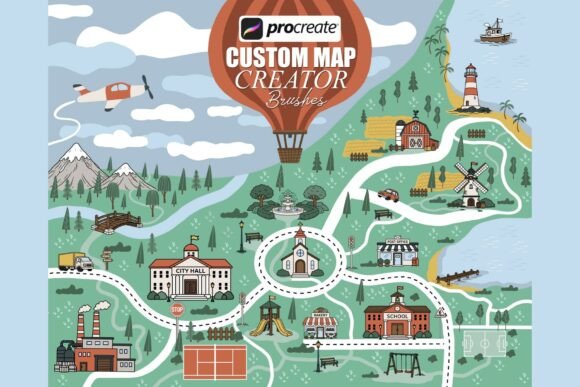
At its core, this brush set is a collection of 120 hand-drawn stamp brushes designed specifically for the Procreate app on iPad. Unlike standard texture brushes that apply paint strokes, these function as precise stamps. Each element—from a quaint bakery to a sprawling castle—is pre-rendered in solid black line art, ensuring that every placement looks intentional and stylistically consistent. The beauty of Procreate Map Creator Stamp Brushes lies in their versatility; they serve as the perfect foundation for both fully colored digital illustrations and clean, print-ready black-and-white designs.
The uniformity of the line weight and style is what sets this pack apart. When building a map, consistency is key to making it look professional. If you draw a house by hand, then a church, and then a river, slight variations in stroke thickness or artistic style can make the final image feel disjointed. These brushes eliminate that friction. Because every asset within the set shares the same visual language, your maps instantly achieve a polished, storybook quality without requiring advanced drawing skills.
A Comprehensive Library of Map Elements
The true power of this tool comes from the sheer breadth of its content. With 120 distinct brushes included in the .brushset file, creators have access to a vast library of categorized assets that cover almost every scenario imaginable. The collection is thoughtfully organized to streamline the design process:
- Buildings and Structures: The set includes a wide array of architectural elements ranging from residential homes, townhouses, and shops to public institutions like schools, city halls, and banks. It even covers religious structures such as churches, cathedrals, mosques, and synagogues, as well as fantastical elements like palaces, castles, and barns. This diversity allows for the creation of everything from realistic village layouts to whimsical fantasy kingdoms.
- Landscape and Nature: A map needs context, and this pack provides it through detailed landscape elements. Users can easily place bridges, docks, windmills, lighthouses, mountains, volcanoes, lakes, and rivers. Green spaces are also covered with parks, gardens, playgrounds, and fountains, adding life and color potential to any scene.
- Transportation and Roads: To bring a map to life, you need movement. The set features cars, trucks, and trains, alongside essential road infrastructure like dashed paths, intersections, stop signs, crosswalks, traffic lights, and lampposts. These elements help define the flow and connectivity of your illustrated world.
- Extras and Icons: For those finishing touches, the pack includes direction signs, city silhouettes, and simple icons designed specifically for easy coloring and scaling. These small details add character and utility to the final composition.
Practical Applications Across Industries
While the name suggests a focus on hobbyists, the utility of Procreate Map Creator Stamp Brushes extends far beyond personal projects. Professionals across various sectors find immense value in the efficiency and aesthetic quality these tools provide.
Educational Resources and Children's Publishing
For educators and authors of children's books, these brushes are an invaluable asset. Teachers can quickly generate custom maps for geography lessons, history units, or storytelling exercises. The clean, bold line art is particularly suited for printable coloring pages, which are a staple in classrooms and at home. Authors writing middle-grade fiction can use the set to create accurate, engaging maps for the front matter of their novels, helping young readers visualize the world they are about to explore. The ability to mix and match elements means a teacher can create a "Village of the Future" one day and a "Medieval Kingdom" the next with zero learning curve.
Wedding Designers and Event Planners
In the event planning industry, customization is currency. Wedding planners and stationery designers often struggle to find unique, non-generic templates for venue maps and seating charts. Using Procreate Map Creator Stamp Brushes, designers can craft bespoke illustrated maps that reflect the specific theme of a wedding. Imagine a rustic barn wedding where the map features charming barns, winding country roads, and garden fountains, or a destination wedding on a coast featuring lighthouses and docks. The hand-drawn style adds a personal, artisanal touch that generic clip art simply cannot replicate, elevating the overall guest experience.
Freelance Designers and Content Creators
Freelancers working in branding, marketing, or social media management can leverage these brushes to create eye-catching infographics or location-based content. A travel blogger, for instance, could illustrate a "Hidden Gems of Paris" map using the coffee shop, bakery, and landmark stamps. Similarly, game developers and indie RPG creators can prototype dungeon layouts or overworld maps rapidly during the concept phase. The speed of execution allows professionals to iterate on designs quickly, presenting multiple options to clients without burning hours on manual illustration.
Maximizing Efficiency and Creative Flow
The primary benefit of adopting Procreate Map Creator Stamp Brushes is the dramatic reduction in production time. What once took hours of vector tracing or freehand drawing can now be accomplished in a fraction of the time. This efficiency does not come at the cost of quality; the high-resolution nature of the stamps ensures crisp lines regardless of how large you scale them within the canvas.
Furthermore, the workflow encourages experimentation. Because placing an element is as simple as tapping the screen, creators can try different compositions, move buildings around, and test various landscape arrangements without fear of ruining their work. The "undo" function in Procreate combined with the modularity of these stamps fosters a dynamic creative environment where ideas can be explored freely. For business owners looking to create branded merchandise, such as t-shirts, tote bags, or posters featuring local city maps, this tool offers a scalable solution that maintains professional standards while keeping overhead costs low.
Considerations for Implementation
When integrating this brush set into your workflow, there are a few practical considerations to keep in mind. First, ensure you are comfortable with the basic layering system in Procreate. While the stamps are easy to place, achieving depth—such as having a bridge appear over a river or a tree in front of a house—requires understanding how to arrange layers. Second, while the line art is solid black, the real magic happens when you add color. Use Procreate's selection tools to fill areas with vibrant hues or subtle watercolors to bring the map to life. Finally, remember that these are starting points. You can combine multiple stamps, rotate them, or even paint over them to customize specific details, ensuring your final output remains unique to your vision.
Ultimately, Procreate Map Creator Stamp Brushes represents a shift in how digital artists approach cartography. It democratizes the creation of beautiful, professional maps, making them accessible to anyone with an iPad and a creative spark. Whether you are an educator preparing a lesson, a designer crafting a wedding invitation, or an author building a fantasy realm, this tool provides the building blocks to turn abstract ideas into tangible, visually stunning realities.